
Built to Solve the Problems Systems Engineers Actually Have
Every feature in Trace.Space exists because an engineer hit a wall. Not because it looked good on a feature matrix. This is what the platform does, organized by the problems it solves.



Your AI Agent for Systems Engineering
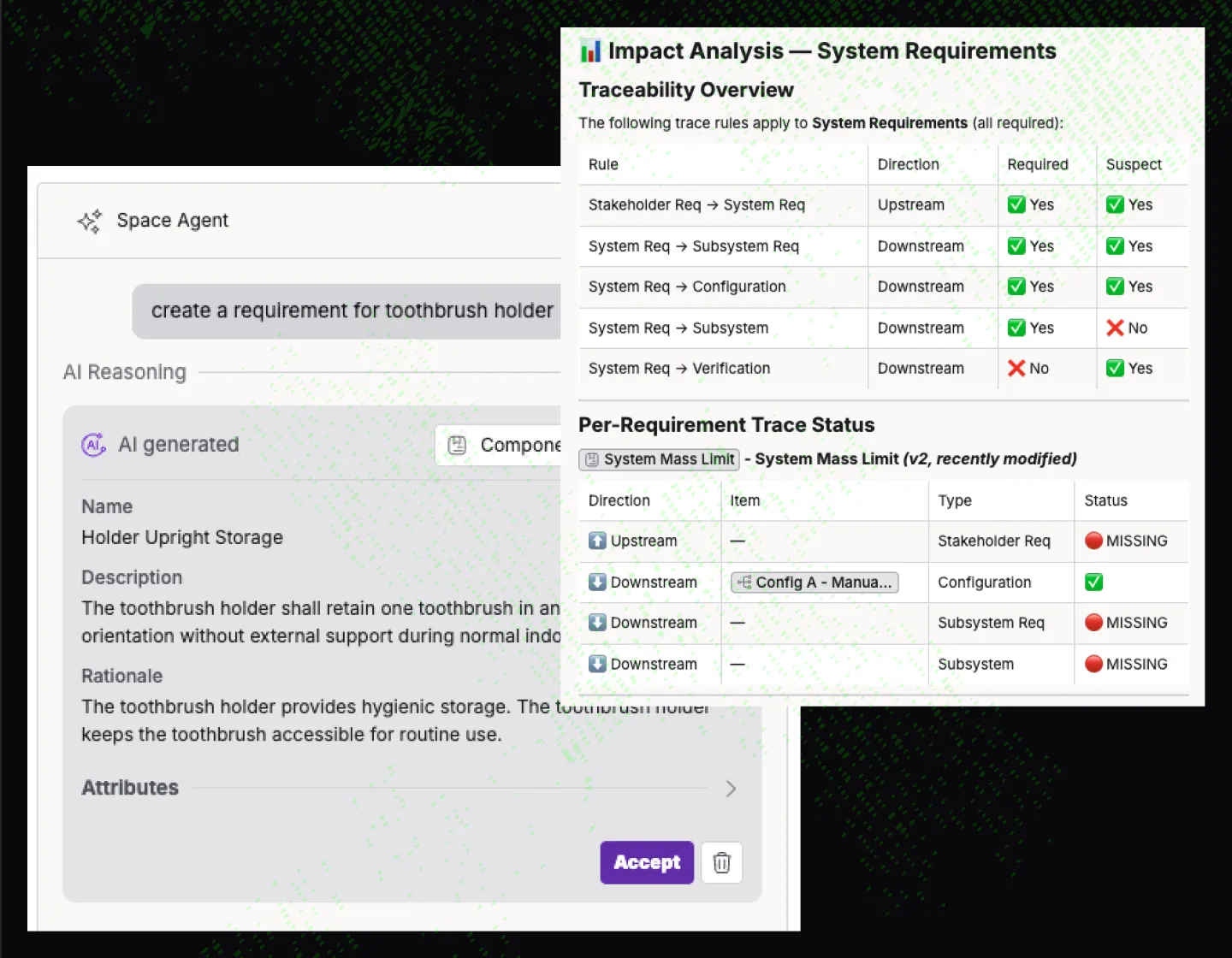
Space Agent is the first AI agent built for systems engineers. It lives inside the platform, works directly with your data model, and handles core engineering tasks 10 to 100x faster than doing them by hand. Coverage analysis, risk assessment, impact analysis, requirements creation, quality checks, traceability analysis, and trace suggestions, all through a conversation.
Ask it where the gaps are in a subsystem. It maps coverage in seconds. Ask it to suggest trace links. It recommends twenty at once and lets you accept them in the interface. Ask it how to use Trace.Space. It knows.
Find the Gaps in Your Traceability Before They Find You
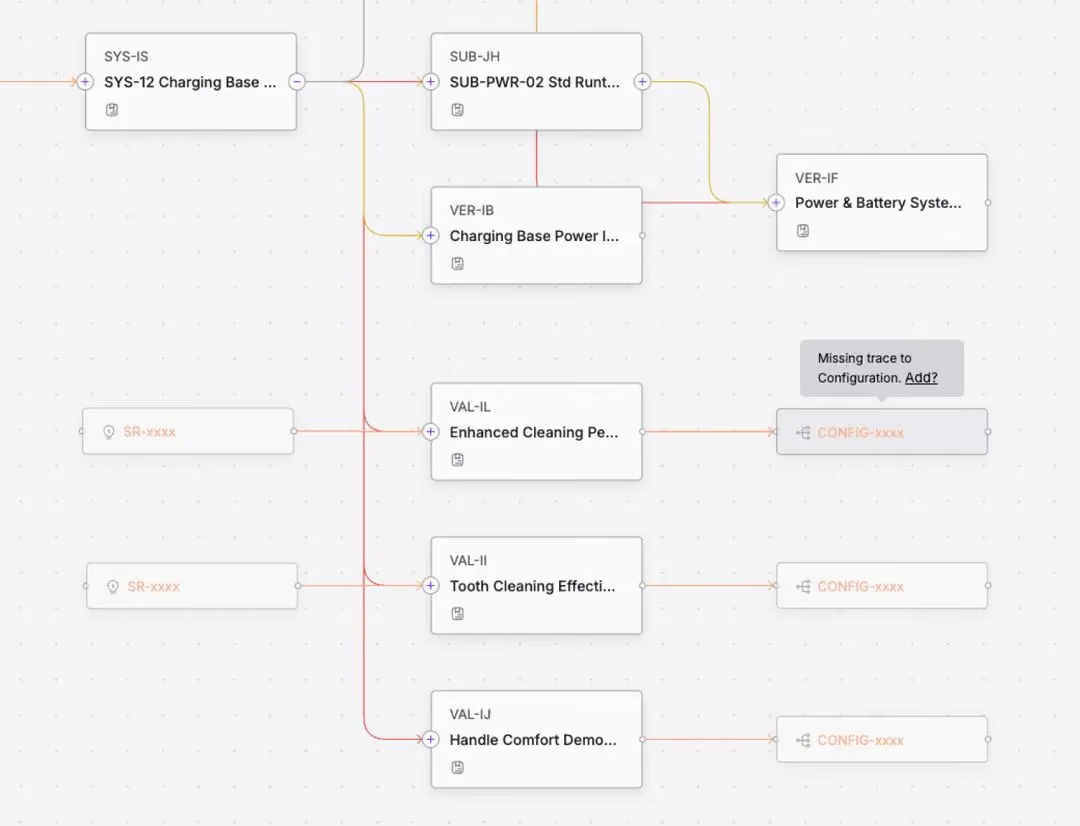
Graph view shows you the full picture: which requirements connect to which tests, which design artifacts, which verification activities. Gaps in coverage are visible immediately, not after a three-week audit.
Matrix view lets you scope a traceability analysis to exactly what matters right now. Filter by subsystem, by status, by time range. Find every test case that failed in the last seven days, then trace up to the system requirements they verify.
Saved filters let you build reusable views for recurring questions. What requirements are still in draft? Which ones were reviewed but never baselined? What changed since last sprint?
Manage Variants Without Losing the Thread
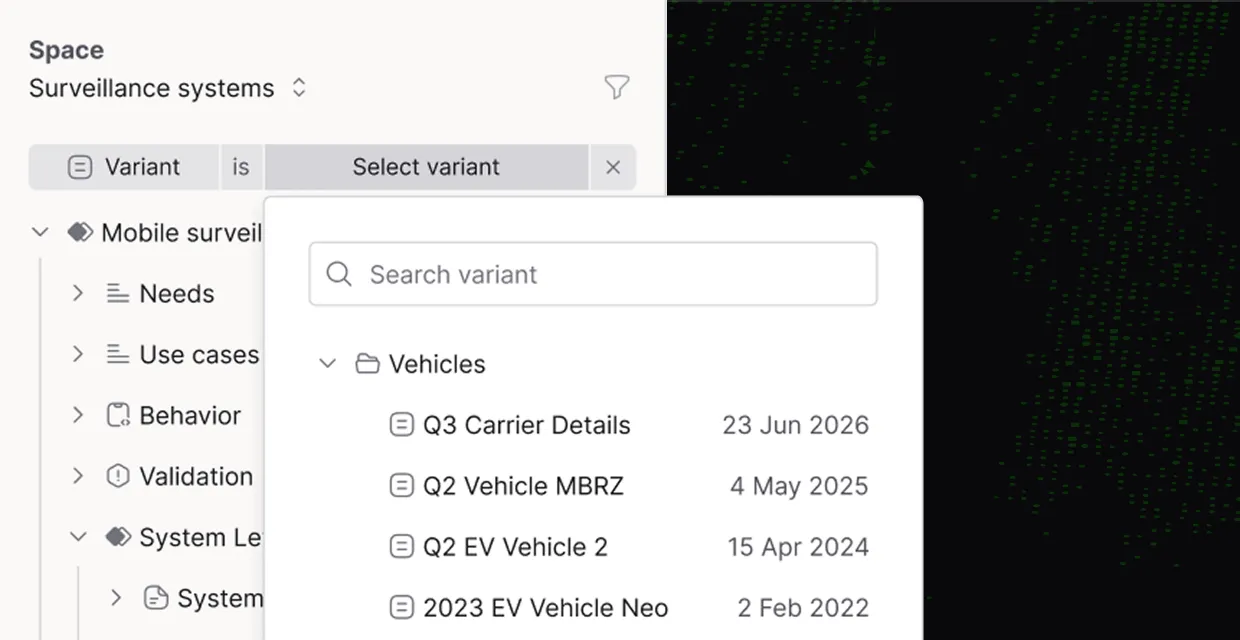
When one customer's requirements extend another customer's requirements, and a third customer adds their own constraints on top, you need a way to filter and scope across configurations without rebuilding your trace structure from scratch.
Trace.Space handles configuration management as a core capability. Scope requirements to specific variants, product lines, or customer configurations. Understand how a change in one configuration affects the shared baseline
Trace Test Failures Back to the Decisions That Caused Them
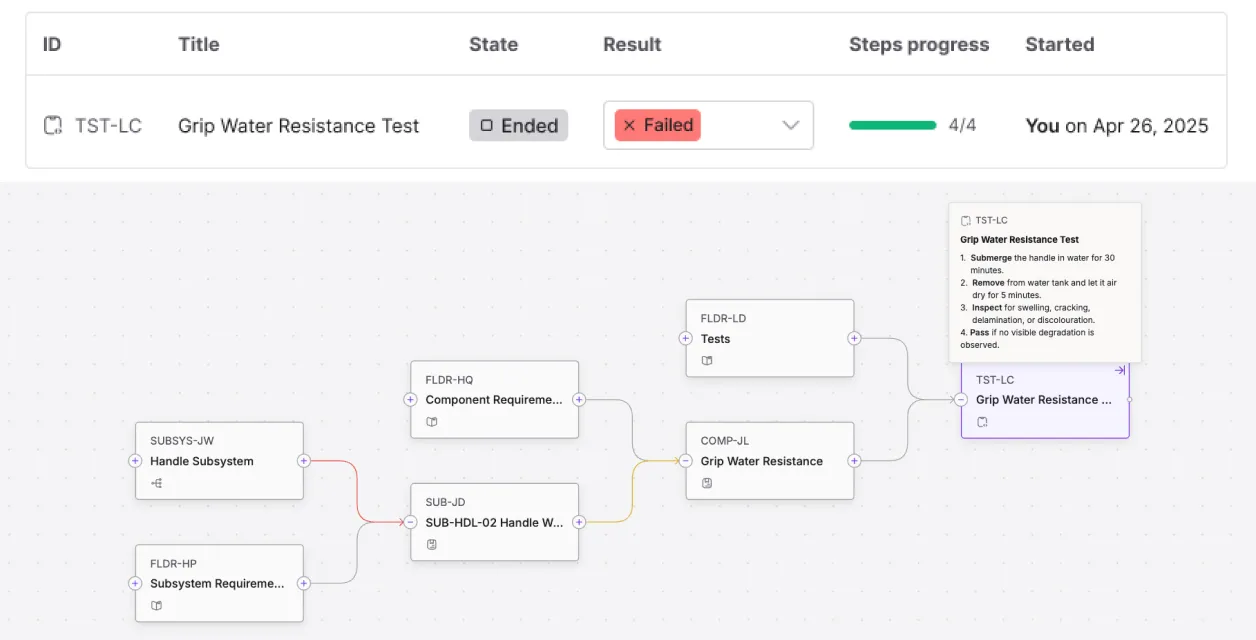
A failed test is not just a failed test. It is a signal that something upstream may have gone wrong: a requirement was ambiguous, a design decision was flawed, or a change was made without understanding the downstream impact.
Trace.Space connects test execution to the full requirement chain. When a test fails, you can trace back to the stakeholder requirement, the system requirement, and the design artifact that led to it. That is how you find root causes instead of patching symptoms.
Cut Review Cycles from Months to Days
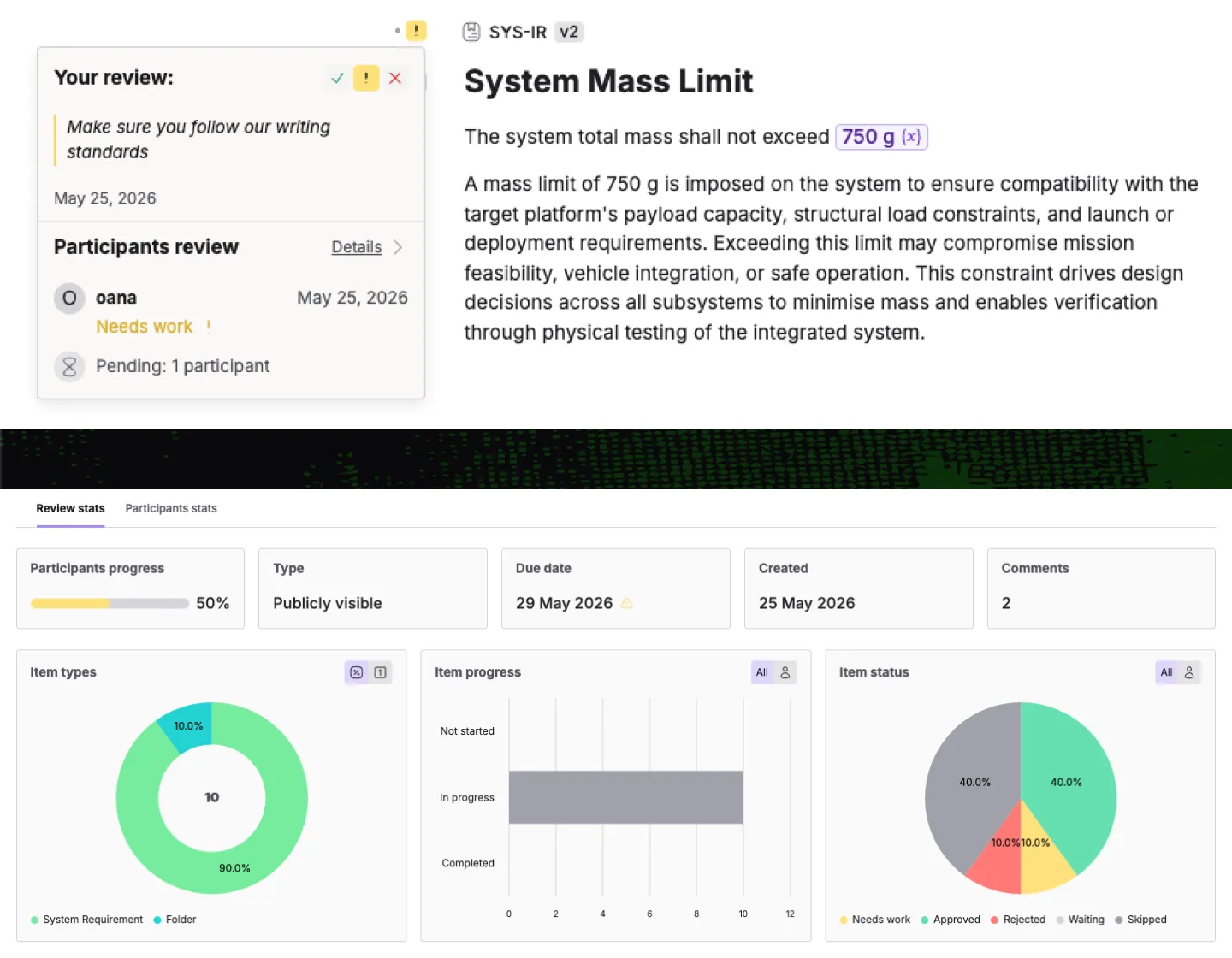
Reviews in complex engineering programs can take weeks to months. Multiple stakeholder groups, multiple iterations, multiple meetings just to get alignment on a single requirement set.
Trace.Space reduces that friction. Add review groups in seconds. Space Agent provides comprehensive starting points for review discussions so your first meeting is productive, not exploratory. Every review comment, approval, and change is tracked and traceable.
Bring Your Requirements In Without Starting Over
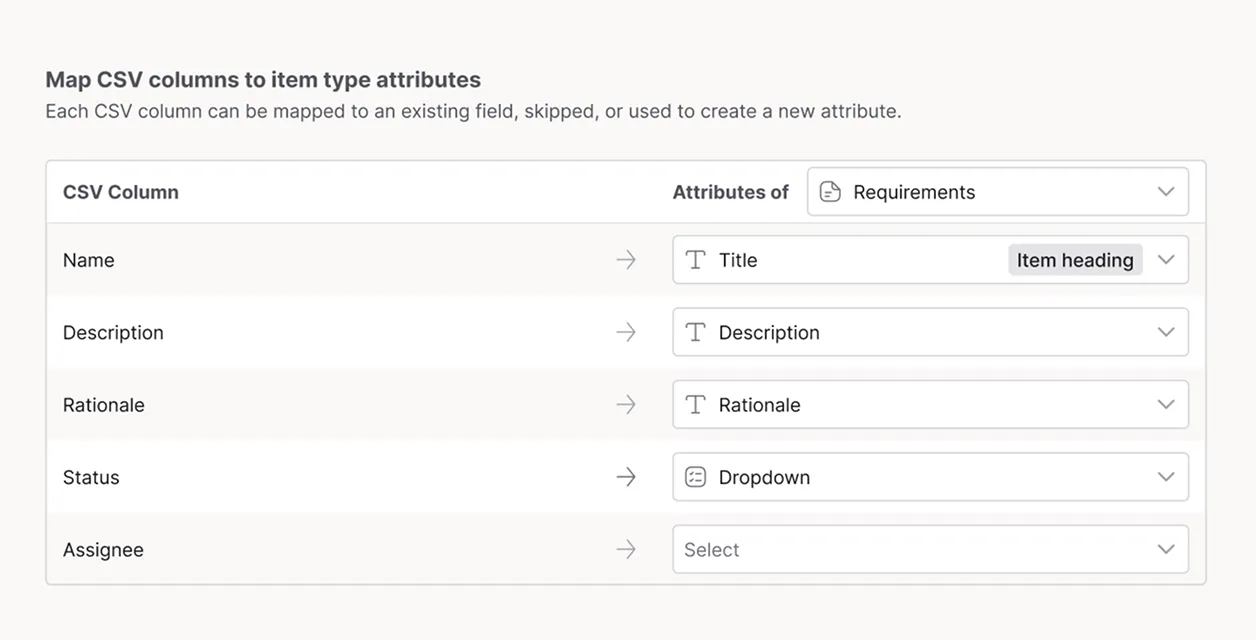
Thousands of requirements in another tool? Import from CSV, Word documents, or via API. Existing trace links are preserved. Automatic normalization means your data is structured and ready to work with from day one.
Need to round-trip with customers or suppliers who will not come into your tool? Export, let them edit, re-import. The sync process will not overwrite or delete information you have already established.
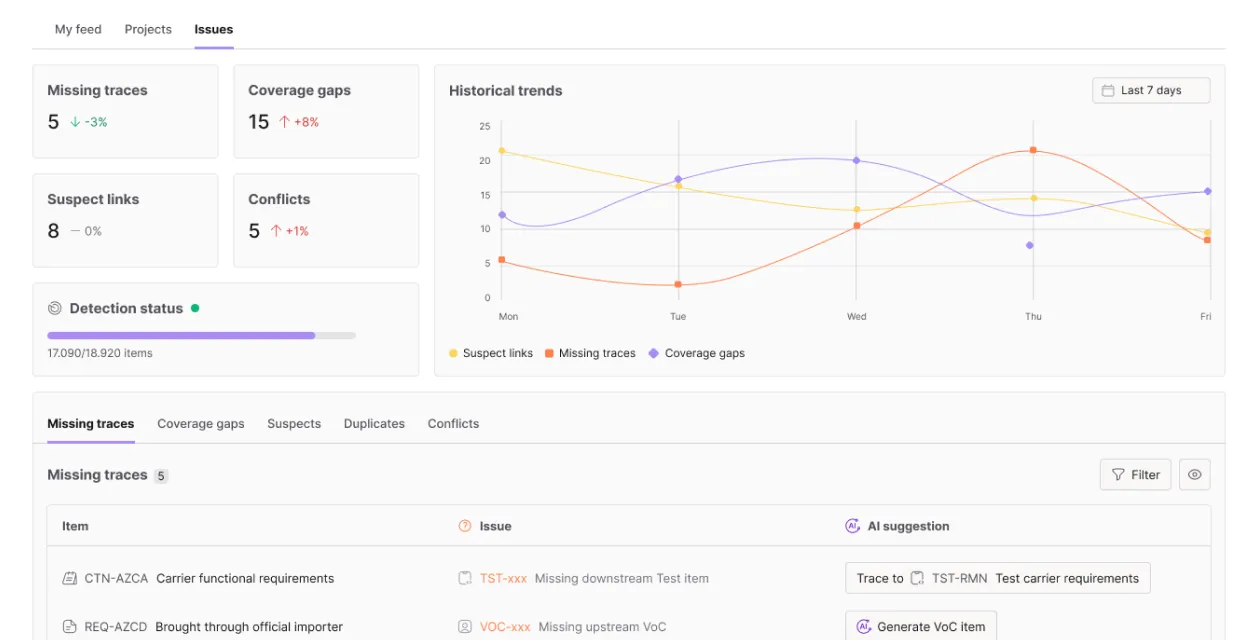
Find Out Something Is Wrong While There Is Still Time to Fix It
Project health dashboards surface the metrics that matter: coverage percentage, requirement maturity, review completion, change velocity. This is where engineers, program managers, and VPs of engineering discover problems before schedule slips, before costs increase, before a flight test that costs $300,000 a pop comes back failed.
Pre-built compliance reports for regulated industries. Configurable dashboards for everything else. Export to PDF, Excel, or pull via API.
Frequently Asked Questions
How does change impact analysis work in Trace.Space?

Change impact analysis in Trace.Space shows the full blast radius of a requirement change before you commit to it. You see which test cases, design elements, and sibling requirements are affected, so you can course-correct before the damage compounds downstream. A single requirement change can ripple through dozens of artifacts, and the platform maps that chain for you.
Can Trace.Space manage product variants and configurations?
Yes, Trace.Space manages variants by letting you filter and scope across configurations without rebuilding your trace structure. When one customer's requirements extend another's and a third adds constraints on top, you keep a single trace structure and scope to the configuration you need. There's no separate copy to maintain for each variant.
How does Trace.Space support formal reviews and sign-off?
Trace.Space supports formal reviews by letting you add review groups in seconds and tracking every comment, approval, and change as traceable history. Space Agent provides starting points for review discussions, so your first meeting is productive instead of exploratory. Reviews that used to take weeks or months get compressed, and every decision stays connected to the requirement it touched
What's the difference between graph view and matrix view?
Graph view shows the full picture of how requirements connect to tests, design artifacts, and verification activities, making coverage gaps visible immediately. Matrix view lets you scope a traceability analysis to exactly what matters right now, filtering by subsystem, status, or time range. You'd use graph view to see the whole structure and matrix view to drill into a specific slice.
Can I trace a failed test back to its source requirement?
Yes, you can trace a failed test back through the full requirement chain to find its root cause. Trace.Space connects test execution to the stakeholder requirement, system requirement, and design artifact that led to it, so a failure points you to the upstream decision behind it. That's how you fix root causes instead of patching symptoms.


See How It Works With Your Data
Book a demo. Bring your requirements. We will show you what Trace.Space does with them.